Photoshop Actions really do help to eliminate repetitive tasks and ultimately speed up your work flow.
Here's a quick tutorial on how to record your own black and white conversion action.

Entrepreneur, Artist, Educator.
Showing posts with label Photographic Education. Show all posts
Showing posts with label Photographic Education. Show all posts
Sunday, May 12, 2013


Saturday, May 15, 2010
Whoa! I'ts been a while

So, I just realized that I haven't posted anything here ALL YEAR!
It's been a pretty active year so far. I've been traveling a lot teaching other photographers about posing and lighting.
We had a great 2 day workshop in Warren at the beginning of the month. 15 people took advantage of the hands on learning opportunity. Check out our facebook page for the cool images that are posted.
I'll be heading out to Maine next week to teach about Senior portraits. The seminar will be held in the Portland area. I have never been to Maine, so I can't wait!
In the mean time, I have a ton of new ideas for our Class of 2011 seniors.
This year's class is gonna ROCK!
Sunday, July 19, 2009
Nice Article in JN
The Detroit Jewish News did a very nice article about the five studios this week.
We are a group of like minded professional photographers dedicated to the art of image making.
See it here
page 2
We are a group of like minded professional photographers dedicated to the art of image making.
See it here
page 2
Wednesday, June 24, 2009
Studio Lighting in Small Spaces


Many of my students ask me about creating a camera room in their homes. It seems that the main concern is space, or more accurately, the lack thereof.
I was at Botsford Hospital this morning creating head and shoulder portraits for the incoming "First Year Residents"(Oh, side note... I have been told that if you get sick and need to go to the hospital, this may not be the best time to do it... see "first year" title.)
The space I set up my camera room in was a hallway just outside the meeting room. It was roughly 12 feet wide and I could back up about 10-12 feet. Even with the space limitations, I was still able to set up my Larson 4x6 soffbox. In my opinion, it's one of the finest light modifiers available.
Thursday, June 11, 2009
Prepping
I just found out that our GLIP (Great Lakes Institute of Photography) is full. That's pretty awesome news considering some classes were cancelled due to lack of turn out.
So as the count down to school draws near, I find myself freaking out trying to get a whole load of work done before I leave for the week. Unfortunately my "studio" work screeches to a halt when I am away teaching.
So, today will be a day of production, new slide preparation, CD/DVD burning and getting equipment ready. And that's just this morning!! :)
Gotta go get to it!
See ya!
So as the count down to school draws near, I find myself freaking out trying to get a whole load of work done before I leave for the week. Unfortunately my "studio" work screeches to a halt when I am away teaching.
So, today will be a day of production, new slide preparation, CD/DVD burning and getting equipment ready. And that's just this morning!! :)
Gotta go get to it!
See ya!
Monday, March 30, 2009
More Image Enhancing Techiniques
Check out this video to learn how simple it is to achieve the look in these images.


Saturday, March 28, 2009
Making your pictures look like photographs
I came up with a set of actions for Photoshop to help speed up our production time by automating repetitive tasks.
One of the elements included in the action "set" is a method to quickly enhance an average looking capture ~ I'm talking about the image as it comes right out of the camera, not the subject matter.
Many of the actions included in the "Deutsch Production Actions" set deal with cropping and resizing images and preparing them for upload to your lab, while others focus on enhancing your portrait and wedding images.
Click on the image to see the larger resolution before and after image. Then watch he video to see how easily this picture was transformed in to a beautiful photograph.

So easy, even cave man.....ah never mind;) Enjoy! ~ Oh, by the way, see my signature at the bottom? That was created with another action that's included in the set :)
One of the elements included in the action "set" is a method to quickly enhance an average looking capture ~ I'm talking about the image as it comes right out of the camera, not the subject matter.
Many of the actions included in the "Deutsch Production Actions" set deal with cropping and resizing images and preparing them for upload to your lab, while others focus on enhancing your portrait and wedding images.
Click on the image to see the larger resolution before and after image. Then watch he video to see how easily this picture was transformed in to a beautiful photograph.

So easy, even cave man.....ah never mind;) Enjoy! ~ Oh, by the way, see my signature at the bottom? That was created with another action that's included in the set :)
Saturday, March 21, 2009
Update on the copyright brush
Ok. I just learned something about Mac's today. Maybe that's why my brain hurts. In order to create the © symbol, you have to press option G while in the type (T) tool.
If you are working on a PC laptop that doesn't have a separate number pad on the right and you're forced to use those numbers at the top of the screen, it won't work either.
I will have to look at an old laptop to figure it out, but until then happy computing:)
If you are working on a PC laptop that doesn't have a separate number pad on the right and you're forced to use those numbers at the top of the screen, it won't work either.
I will have to look at an old laptop to figure it out, but until then happy computing:)
Friday, March 20, 2009
Saturday, July 05, 2008
Black & White Conversion in Photoshop
Are you tired of converting your images to black and white only to find color casts in your prints when they come back from the lab?
This series of commands will result in black & white prints that have no color casts to them because you are deleting all color information before printing.
Open an Image and go to Image>Mode>Labcolor.
Under the Channels tab, delete channel b. Delete Alpha 2 channel.
Convert Mode to Greyscale. Image>Mode>Greyscale.
Convert Mode back to RGB color so the lab can print it Image>Mode>RGB Color.
That's it! Simply write an action for this and you can convert files to black and white with the push of a button!
Simple, huh?
This series of commands will result in black & white prints that have no color casts to them because you are deleting all color information before printing.
Open an Image and go to Image>Mode>Labcolor.
Under the Channels tab, delete channel b. Delete Alpha 2 channel.
Convert Mode to Greyscale. Image>Mode>Greyscale.
Convert Mode back to RGB color so the lab can print it Image>Mode>RGB Color.
That's it! Simply write an action for this and you can convert files to black and white with the push of a button!
Simple, huh?
Thursday, June 26, 2008
Images from GLIP
One of my passions is to teach others about the art of photography. I feel it is my duty to share what knowledge I have with anyone who is willing to listen.
With the industry exploding with new comer photographers, there are plenty of students out there eager to learn the ropes from a {sigh} seasoned veteran. I thought I would post a few of the images that I created while teaching at GLIP.


With the industry exploding with new comer photographers, there are plenty of students out there eager to learn the ropes from a {sigh} seasoned veteran. I thought I would post a few of the images that I created while teaching at GLIP.


Comments are always welcomed!
Tuesday, March 04, 2008
Busy Traveling
I know that it has been a while since I have posted anything here. That is partially due to the fact hat my schedule has been so busy.
In February I was asked to teach a wedding seminar to the Professional Photographers of Michigan convention in Ypsilanti (I know, not a very exciting.
The program was a huge success and the attendees walked away with huge amounts of information about the art and science of photography.
Just this past weekend, I was helping a friend with his teaching endeavors which took us to Waterloo , Iowa on Saturday then to Dayton, Ohio on Sunday morning. What a long night of driving!!!
We hope to keep busy photographing and teaching, so stay tuned for updates on where we will be next.
In February I was asked to teach a wedding seminar to the Professional Photographers of Michigan convention in Ypsilanti (I know, not a very exciting.
The program was a huge success and the attendees walked away with huge amounts of information about the art and science of photography.
Just this past weekend, I was helping a friend with his teaching endeavors which took us to Waterloo , Iowa on Saturday then to Dayton, Ohio on Sunday morning. What a long night of driving!!!
We hope to keep busy photographing and teaching, so stay tuned for updates on where we will be next.
Sunday, May 20, 2007
New Slide Shows CD -(reprint)
Below is a sample of a Family Portrait Session from our "Slide Shows CD".
Slideshows are great for evoking emotion during the image presentation appointment. They're also a great source for ideas and inspiration for photographers.
We are compiling a new disc that will contain 10-15 new Slide Shows that you can receive for FREE with the purchase of our "Getting Back to Basics" DVD.
For special pricing on the DVD, see the post dated October 20th, below.
For more information about the CD, visit our website
(click the play icon to begin)
Slideshows are great for evoking emotion during the image presentation appointment. They're also a great source for ideas and inspiration for photographers.
We are compiling a new disc that will contain 10-15 new Slide Shows that you can receive for FREE with the purchase of our "Getting Back to Basics" DVD.
For special pricing on the DVD, see the post dated October 20th, below.
For more information about the CD, visit our website
More from "Getting Back to Basics DVD" -(reprint)
I haven't had a chance to update the blog lately and I feel really bad about it. {...big sigh...}
Below is another excerpt from the Getting Back to Basics DVD. It will make a great addition to your library. Whether you are new to the photography business or you're a seasoned veteran, there is something for everyone included on the disc.
The Pre-release price is $59. As an added incentive, we will include our
"Slide Shows" CD.
The CD is a great source for posing ideas or for inspiration. Included on the CD are two Sr. sessions, including live footage, an infant session, child session and a two family sessions.
We are creating a CD with brand new slide shows and will include two more family shows, a maternity show and much more!
Order any of our educational products before December 31, 2006 to take advantage of the FREE slide shows CD. You can order by email or by phone.
Below is another excerpt from the Getting Back to Basics DVD. It will make a great addition to your library. Whether you are new to the photography business or you're a seasoned veteran, there is something for everyone included on the disc.
The Pre-release price is $59. As an added incentive, we will include our
"Slide Shows" CD.
The CD is a great source for posing ideas or for inspiration. Included on the CD are two Sr. sessions, including live footage, an infant session, child session and a two family sessions.
We are creating a CD with brand new slide shows and will include two more family shows, a maternity show and much more!
Order any of our educational products before December 31, 2006 to take advantage of the FREE slide shows CD. You can order by email or by phone.
The Best Things in Life are Free -(reprint)
Isn't that a line from a Beatles song? OK... I'll spare you my singing, but it's tue.
Everywhere you look, someone is trying to sell you something to make your life faster, stronger, better than it was before.
When it comes to Photoshop, whenever and wherever I can use actions, to speed up my workflow and to make my images look better, I do.
I found some really neat actions on jeremydaaler.com. Jeremy has written some actions to simulate classic film effects.
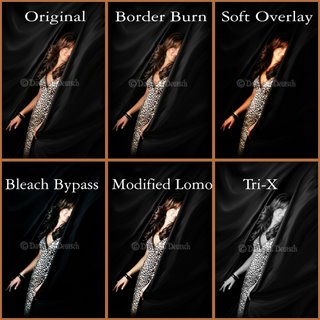
click on the image to see it larger
As you can see in the photo, you can apply a soft overlay, bleach bypass and a tri-x filter. Ahhh... it brings back memories of long hours spent in the dark room with the aroma of chemicals wafting through the air. "Those were the days"... isn't that another song?? (I digress)
Anyway, you can download those actions from Jeremy's site. I wrote the other two actions that you see (border burn & modified lomo) to enhance my photography and to make it a little different than that of everyone else.
You can download those actions here for FREE. The only thing I ask in return is that you post a comment here to let me know how you like them.
Fair enough?
Everywhere you look, someone is trying to sell you something to make your life faster, stronger, better than it was before.
When it comes to Photoshop, whenever and wherever I can use actions, to speed up my workflow and to make my images look better, I do.
I found some really neat actions on jeremydaaler.com. Jeremy has written some actions to simulate classic film effects.
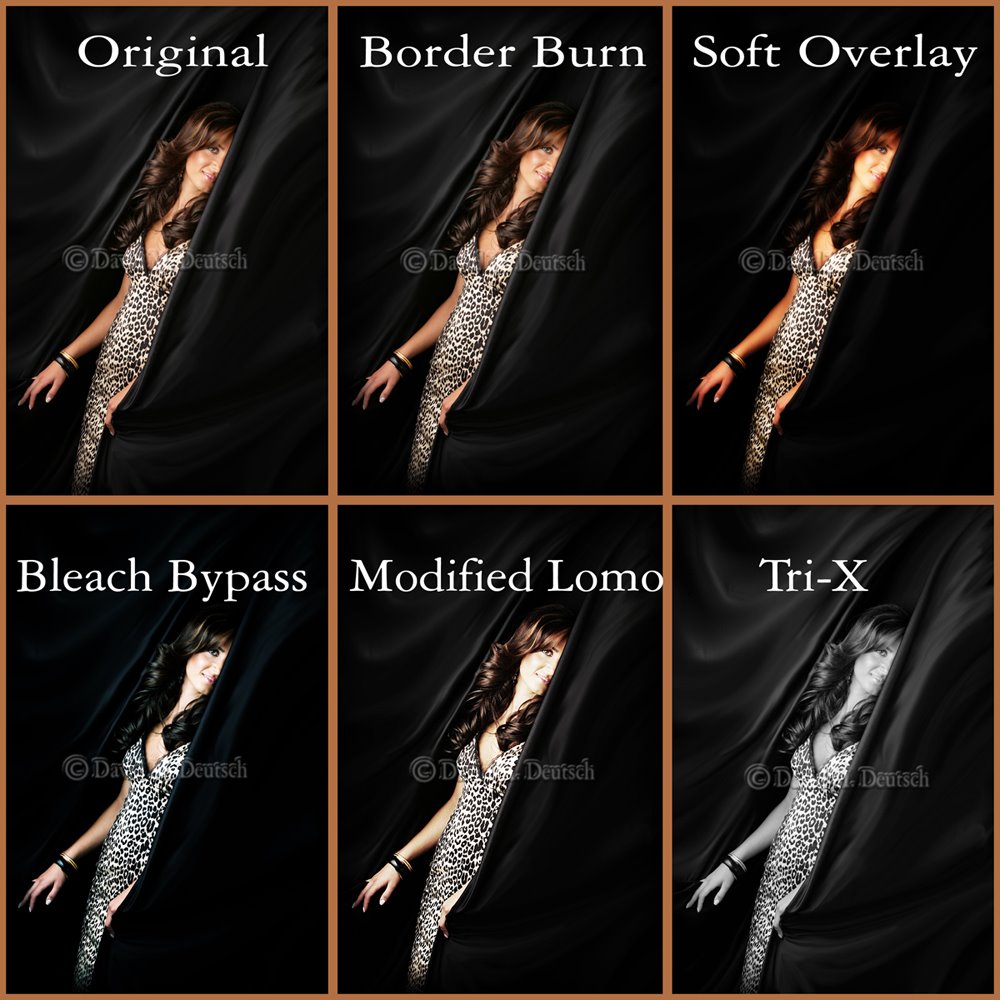
As you can see in the photo, you can apply a soft overlay, bleach bypass and a tri-x filter. Ahhh... it brings back memories of long hours spent in the dark room with the aroma of chemicals wafting through the air. "Those were the days"... isn't that another song?? (I digress)
Anyway, you can download those actions from Jeremy's site. I wrote the other two actions that you see (border burn & modified lomo) to enhance my photography and to make it a little different than that of everyone else.
You can download those actions here for FREE. The only thing I ask in return is that you post a comment here to let me know how you like them.
Fair enough?
Stock 20 Referral Program -(reprint)
Stock20.com creates high quality music for media production.
If you create a free account, they will give you a $7 store credit (which will get you one free song). If you use my referral link (below) we can both get an extra $7 in free music--you'll get a total of $14.
Here's how:
1) Click this link, then create a free account (it takes about a minute): http://www.stock20.com/gvr.php?rc=65xl2nv3151asd5v2x
2) Your new account will automatically be credited with $7 (enough to get a free song). Then you will get an additional gift certificate by e-mail, just for creating an account. That's a total of $14 in free music. Note: You can be assured that Stock20.com will not give away your info. They send out one e-mail per month when they release their new songs.
If you create a free account, they will give you a $7 store credit (which will get you one free song). If you use my referral link (below) we can both get an extra $7 in free music--you'll get a total of $14.
Here's how:
1) Click this link, then create a free account (it takes about a minute): http://www.stock20.com/gvr.php?rc=65xl2nv3151asd5v2x
2) Your new account will automatically be credited with $7 (enough to get a free song). Then you will get an additional gift certificate by e-mail, just for creating an account. That's a total of $14 in free music. Note: You can be assured that Stock20.com will not give away your info. They send out one e-mail per month when they release their new songs.
More Royalty Free Music -(reprint)
Being a member of PPA (ProfessionalPhotographer of America) member has it's benefits.
I got an email from HQ sharing about a new member benefit, their partnership with Stock20.com, a new royalty free music company.
I visited their website and found some really nice music that will work great for wedding, senior and children's portrait slideshows.
The cool thing about them is they are building their company around the needs of us... Professional Photographers.
Ok... that is cool but I found that they are located in Muskegon, MI. What's up with that??? First the E-cells, now the music.
Now, the very best part? The songs are only $7.00 each! No... that is not a typo! They really are ONLY $7.00 each .
Check out the included sample, then visit their website for yourself. You'll be glad you did.
I got an email from HQ sharing about a new member benefit, their partnership with Stock20.com, a new royalty free music company.
I visited their website and found some really nice music that will work great for wedding, senior and children's portrait slideshows.
The cool thing about them is they are building their company around the needs of us... Professional Photographers.
Ok... that is cool but I found that they are located in Muskegon, MI. What's up with that??? First the E-cells, now the music.
Now, the very best part? The songs are only $7.00 each! No... that is not a typo! They really are ONLY $7.00 each .
Check out the included sample, then visit their website for yourself. You'll be glad you did.
New Power Cells Replace Batteries -(reprint)
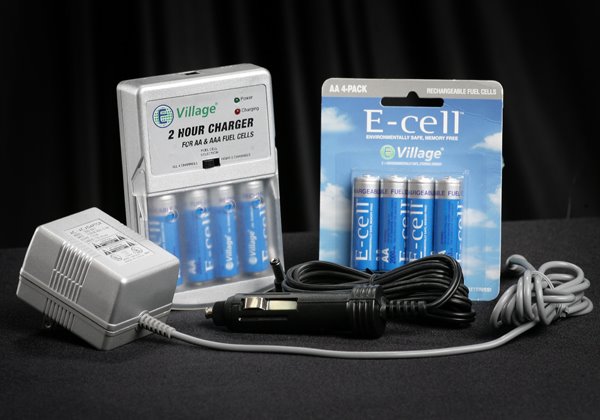
Ever since going digital, it seems that we use a ton of AA batteries. We use them in our radio slaves and in our four Canon flashes, so you can imagine the number of batteries we would go through in a week.
There is a company called Energy Village located in Muskegon, Michigan that has come up with a environmentally safe alternative power cell. They look and perform just like AA (or 9 volt, if you prefer) batteries but the differrence is that when they die, you just pop them in the supplied charger and in two hours they are fully charged and good to go.
You can read more about them on their corporate website or you can order them by calling customer service at Allied Photo and Imaging Lab in Grand Rapids, Michigan.
Simplified Image Enhancement -(reprint)
One the benefits of being in this industry is meeting so many talented people that can help make our lives easier.
When it comes to retouching in Photoshop, I have found Ron Nichols Retouch Palette to be just the right fit for speeding up my retouching and for making it look more consistant.
Whether you do all of your retouching yourself, or you have a army of retouchers working for you, the Palette will help make your workflow more efficient and more consistant.
Check out Ron's website for more information about the Palette.
When it comes to retouching in Photoshop, I have found Ron Nichols Retouch Palette to be just the right fit for speeding up my retouching and for making it look more consistant.
Whether you do all of your retouching yourself, or you have a army of retouchers working for you, the Palette will help make your workflow more efficient and more consistant.
Check out Ron's website for more information about the Palette.
Free Video Coding -(reprint)
I found this great site that creates html code for your video and audio files!
You can code any type of video or audio files for use on your web site. It's really simple to use and best of all... It's FREE!
(hense the name) :)
You just answer a few questions about your project, and voila, the program produces the code for you. You just copy it and paste it to your web site or blog. How simple is that??
Check it out http://freevideocoding.com or click the link located under the map in the right column of my blog.
You can code any type of video or audio files for use on your web site. It's really simple to use and best of all... It's FREE!
(hense the name) :)
You just answer a few questions about your project, and voila, the program produces the code for you. You just copy it and paste it to your web site or blog. How simple is that??
Check it out http://freevideocoding.com or click the link located under the map in the right column of my blog.
Subscribe to:
Posts (Atom)